In this article, I’ll walk you through six free reverb plugins that are worth keeping in your folder. Reverb shapes the sense of space in a mix, and finding the right plugin makes a real difference in how a track feels. Some reverbs aim for clean, transparent room sounds, while others focus on plate character, vintage warmth, or huge ambient tails for sound design work.
Over the years, I’ve tested plenty of free reverb plugins, and the ones on this list are the tools I keep coming back to because they sound good, run reliably, and fit different production styles without much trouble.
This list isn’t about chasing every freebie. It’s about practical reverb plugins that can handle everything from short room ambience to long, atmospheric tails without costing anything to add to your setup.
Whether you produce in Ableton, FL Studio, Logic, or any other DAW, these reverbs should slot into your sessions without much fuss. Let’s get into it.
1. Dragonfly Reverb
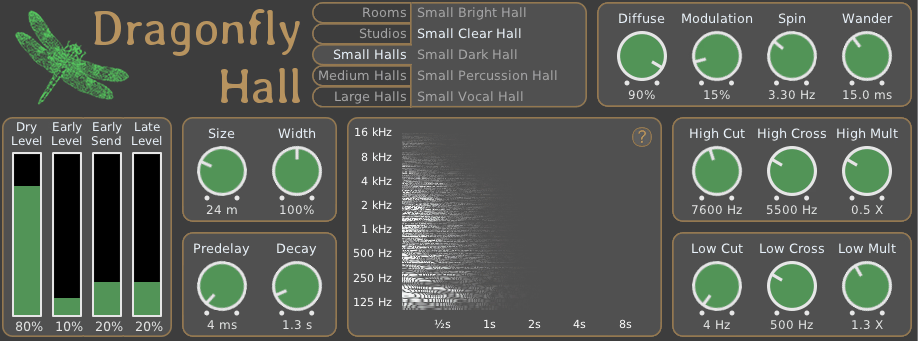
For producers who want a versatile reverb plugin that covers multiple algorithm types, Dragonfly Reverb is one of the better free options around. What I like about this plugin is how it splits its functionality across separate reverb plugins, each focused on a specific job. There’s a hall reverb, a room reverb, a plate reverb, and an early reflections plugin, which gives you flexibility without forcing one algorithm to do everything.
Inside any DAW, Dragonfly works as a standard set of reverb plugins, and the interfaces are clean enough that you’ll figure them out quickly. For producers who want a reliable free reverb collection that handles different situations, this is a useful set to have around.
- Hall Reverb
As in the screenshot, Tthe hall reverb handles longer, more spacious tails that work well for vocals, pads, and orchestral instruments. It sounds clean and natural, with the smooth diffusion you’d expect from a hall-style algorithm.
I find it useful for adding depth to lead vocals or sustained synth parts where you want a sense of space without anything obvious or processed-sounding.
- Room Reverb
The room reverb focuses on shorter, tighter spaces that suit drums, percussion, and acoustic instruments. The room sound feels realistic, with controlled decay that doesn’t muddy up the source.
I appreciate this for drum bus work, where a small room reverb can add weight and presence without making the kit sound washed out.
- Plate Reverb
The plate reverb delivers that classic dense, slightly metallic plate sound that works well on vocals and snares. It’s musical and easy to dial in, with smooth tails that sit nicely behind the source.
For producers chasing vintage pop, rock, or R&B tones, this plate reverb is a solid choice and pairs well with the other reverb types in the collection.
- Early Reflections
The early reflections plugin focuses specifically on the first reflections of a space, which adds depth and realism without long tails. This is useful when you want a sense of placement rather than obvious reverb.
I find this works well on dialogue, vocals, or any source where you want it to sound like it’s in a real space without committing to a full reverb tail. Dragonfly Reverb is a practical free reverb collection that handles multiple situations well, and it’s worth having all four plugins in your folder.
Dragonfly Reverb comes in VST, VST3, AU, and LV2 formats for macOS, Windows, and Linux users.
2. Platone Studio Flex Reverb
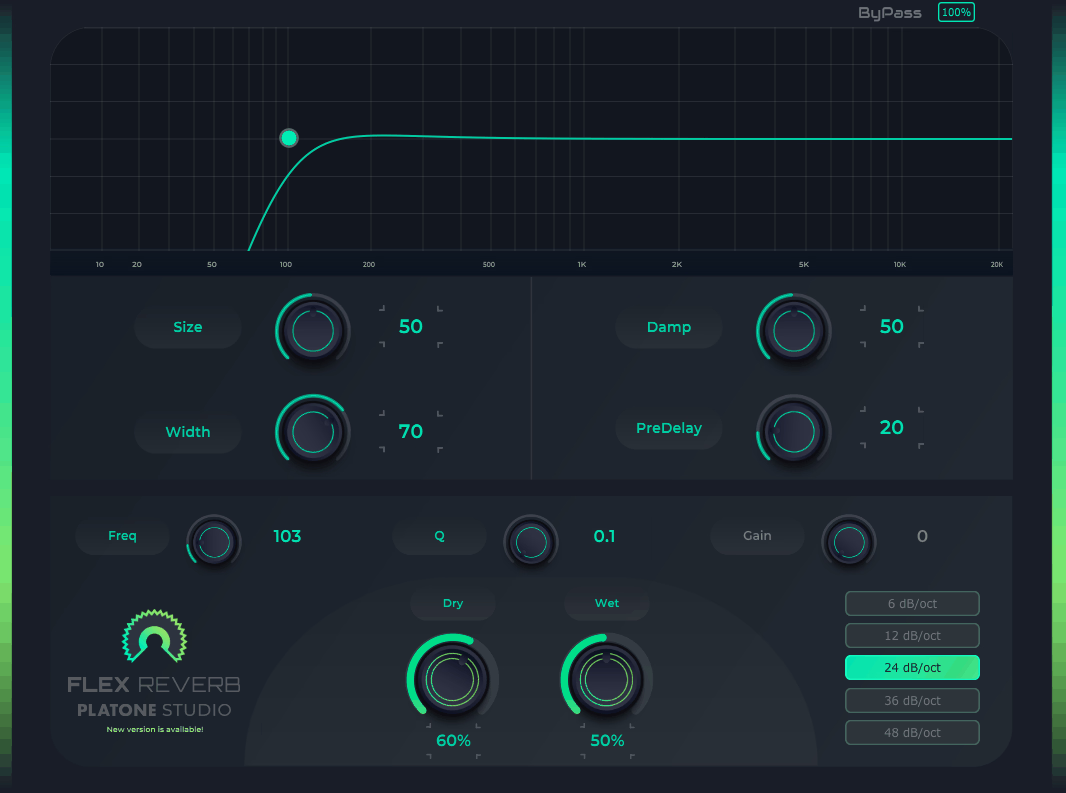
A useful option for producers who want a flexible algorithmic reverb without paying anything, Flex Reverb covers a lot of ground for a free plugin. What I appreciate about Platone Studio’s plugin is how easy it is to shape the reverb to fit different situations. The controls are straightforward, and the sound itself stays musical even when you push longer decay times.
Inside any DAW, Flex Reverb slots in as a quick, dependable choice when you need a single reverb that can handle room sounds, halls, or plate-style tails. For producers who want flexibility without complexity, this plugin is a solid pick.
- Adjustable Reverb Sizes
The plugin lets you adjust the reverb size across a wide range, from small rooms to larger ambient spaces. The size control feels natural, and the decay character stays musical at different settings.
I find this useful when I want one reverb that can shift between intimate and spacious sounds depending on the track or section.
- Tone Shaping
The tone shaping controls let you adjust the brightness and weight of the reverb tail, which helps fit it into different mix contexts. Rolling off some highs keeps the reverb sitting behind the source, while brightening it can add air and presence.
This kind of control saves you from stacking an EQ after the reverb, which keeps the signal chain simpler and more efficient.
- Modulation Options
There are modulation options that add subtle movement to the reverb tail, giving it a more organic feel. The depth and rate are responsive enough to dial in gentle motion or more obvious warble.
I usually keep modulation light for clean reverbs and increase it when I want a more chorused, swirling effect on pads or ambient layers.
3. Variety Of Sound epicPLATE mkII
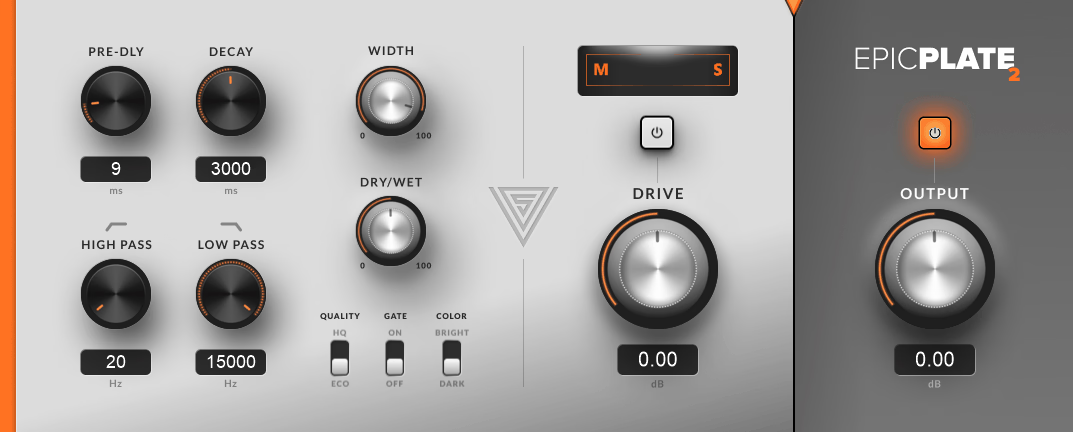
If you need a free plate reverb that delivers genuine vintage character, epicPLATE mkII is one of the better options out there. What I like about Variety Of Sound’s plugin is how musical the plate algorithm sounds. It captures that dense, slightly metallic plate character that works well on vocals, snares, and synth leads where you want a classic reverb sound.
The interface looks a little dated, but the sound quality holds up well next to paid plate emulations. For producers who want a reliable plate reverb without spending money, this plugin is worth having around.
- Plate Algorithm Quality
The plate algorithm sounds rich and characterful, with the smooth diffusion you’d expect from real plate reverbs. It works especially well on vocals, where it adds that vintage, polished feel.
Snare drums also benefit from the added size and presence, which is useful in pop, rock, and EDM production where snares need to feel bigger without sounding washed out.
- Tone Shaping Controls
The built-in damping and EQ controls let you shape the reverb’s brightness and weight quickly. Rolling off some lows keeps the reverb from clashing with the kick and bass in busy mixes.
High-frequency damping helps the reverb sit politely behind the dry signal, and the controls are responsive enough to dial in fast without much guesswork.
- Stereo Width
The stereo width control opens up the reverb tail nicely without losing focus or smearing the source. You can go from a focused mono-style plate to a wider, more immersive tail with one knob.
For producers chasing that wide, modern reverb sound, this control gives you flexibility, and it pairs well with mid-side processing if you want even more control over how the reverb spreads. epicPLATE mkII is a solid plate reverb for producers who want classic vintage character without paying for a premium emulation, and it’s earned its place in plenty of my mix chains.
epicPLATE mkII comes in VST format for Windows users.
4. TAL-Reverb-4
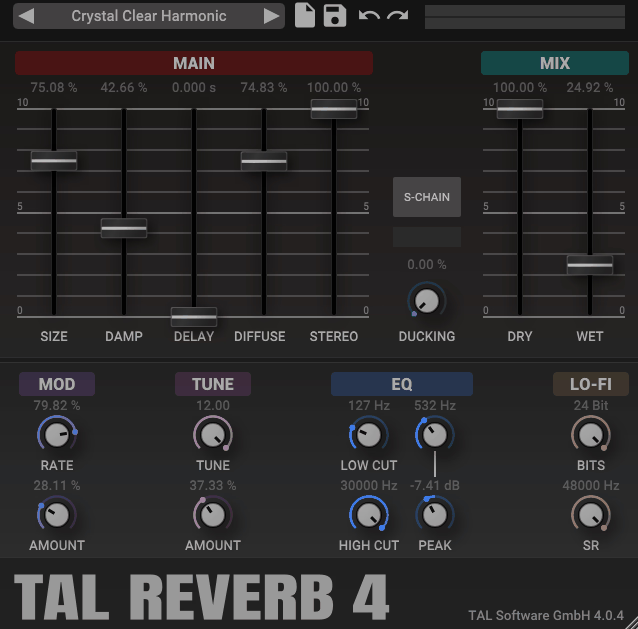
A favorite among producers for its clean, easy-to-use sound, TAL-Reverb-4 is one of the more popular free reverb plugins around. The thing I like about this plugin is how reliable it feels. It handles short rooms, medium halls, and longer ambient tails equally well, and the sound stays musical even when you push longer decay times.
Inside any DAW, TAL-Reverb-4 works as a quick, dependable choice for everyday reverb tasks. For producers who want a free reverb that just sits well in mixes, this plugin is a solid pick.
- Reverb Size Control
The plugin gives you a size control that adjusts the reverb space across a useful range. The decay character stays consistent across different sizes, which makes it easy to dial in the right space without much trial and error.
I find this useful when I want a single reverb that can adapt to different sources, from drum buses to vocal sends, without needing multiple plugins.
- Pre-Delay
The pre-delay control lets you separate the dry signal from the reverb tail, which is useful for keeping vocals and other lead elements sitting forward in the mix. Even short pre-delays can add clarity and depth.
I use pre-delay regularly on vocals to give them space without the reverb crowding the dry sound, and TAL-Reverb-4 makes this easy to dial in.
- Damping Controls
The damping controls let you shape the brightness of the reverb tail. Higher damping settings darken the reverb, which helps it sit behind the dry signal in busy mixes.
I appreciate having this kind of tonal control inside the plugin since it saves a step and keeps the signal chain simpler.
- Stereo Width
The stereo width options spread the reverb tail nicely across the stereo field, which is useful when you want to fill out a mix without making things sound artificial.
For producers who want flexibility in how spacious the reverb feels, the width controls give you room to shape exactly what fits the track. TAL-Reverb-4 is a practical, reliable reverb that handles everyday tasks well, and it’s a free plugin that earns its keep through ease of use and consistent sound.
TAL-Reverb-4 comes in VST, VST3, AU, and AAX formats for macOS and Windows users.
5. Denis Tihanov OrilRiver
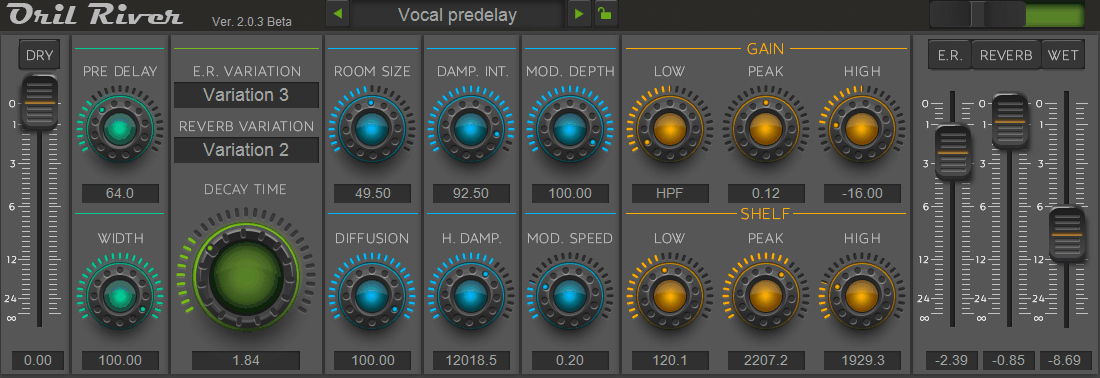
For producers who want a free algorithmic reverb with detailed control, OrilRiver is a long-time favorite that still holds up well. What I appreciate about Denis Tihanov’s plugin is how feature-rich it is for being free. It includes multiple early reflection patterns, detailed damping controls, and modulation options that you’d usually find in paid algorithmic reverbs.
Inside any DAW, OrilRiver works as a flexible reverb tool for producers who like having more control over how the reverb behaves. The interface is functional rather than flashy, but the sound quality makes up for it.
- Multiple Reverb Algorithms
The plugin offers multiple reverb algorithms that range from small rooms to large halls. Each algorithm has its own character, and switching between them is straightforward.
I find this useful for matching the reverb type to the source, since a vocal might benefit from a different algorithm than a drum bus or pad layer.
- Detailed Damping Controls
The damping controls are more detailed than what you’d find in simpler reverbs, which gives you fine control over how the reverb tail decays. You can shape both high-frequency and low-frequency damping independently.
This is useful for fitting the reverb into specific mix contexts, especially when you want the tail to sit behind a busy arrangement without competing for space.
- Modulation Options
The modulation options add subtle movement to the reverb tail, which prevents it from sounding too static. The modulation feels musical rather than overdone, which keeps the reverb sitting well in busy mixes.
I usually leave modulation light for clean reverbs and increase it when I want a more chorused or detuned feel on pads or ambient layers. OrilRiver is a detailed, flexible free reverb that gives producers more control than most free options, and it’s worth having around for situations where you need precise reverb shaping.
OrilRiver comes in VST format for Windows users.
6. Linda Audio Stargazer
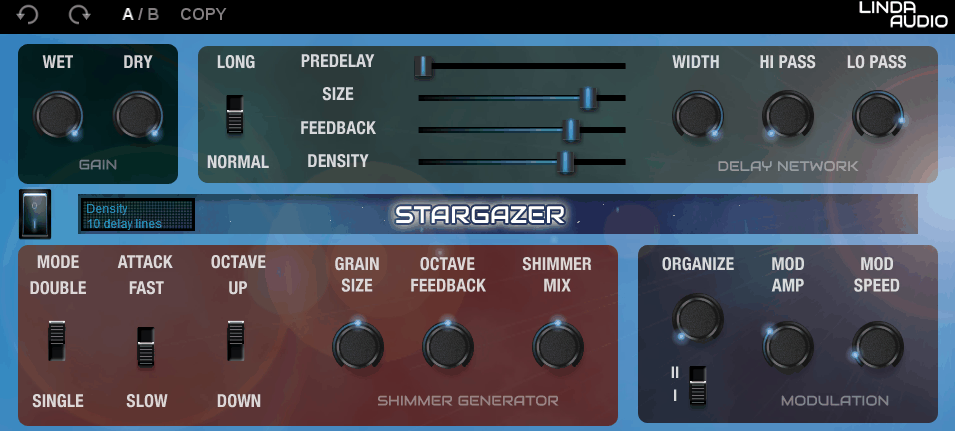
Closing out the list, Stargazer is a free reverb plugin focused on creating long, atmospheric tails for ambient and creative sound design work. What I like about Linda Audio’s plugin is how well it handles long, spacious reverbs. Rather than focusing on realistic room or hall sounds, it leans into ambient, dreamy tails that work great for pads, vocals, and atmospheric design.
Inside any DAW, Stargazer slots in nicely when you want a reverb that adds atmosphere rather than just realistic space. For producers working in ambient, post-rock, dreamy pop, or sound design, this plugin is a useful free option.
- Long Atmospheric Tails
The plugin specializes in long, atmospheric reverb tails that wash out into ambient textures. The decay can stretch into territory that’s more about mood than realism, which is genuinely useful for creative work.
I use Stargazer on pad layers and vocal sends when I want the reverb to be part of the arrangement rather than just supporting the dry signal.
- Modulation Section
The modulation section adds movement to the reverb tail, giving it that classic ambient swell feel. The modulation feels musical, which keeps long reverbs from sounding static or boring.
This is useful for ambient and cinematic work where you want the reverb itself to evolve over time rather than just providing space.
- Tone Shaping
The tone shaping controls let you brighten or darken the reverb tail to fit the genre or mood of the track. Brighter settings work well for dreamy, shimmery effects, while darker settings suit more cinematic or moody contexts.
I appreciate having this kind of tonal control inside the plugin, since it lets you adapt the reverb without needing extra EQ plugins after it.
- Easy Workflow
The interface is clean and easy to navigate, with the essential controls visible at a glance. Stargazer comes in VST, VST3, and AU formats for macOS and Windows users.
Last Words
Putting this list together reminded me that free reverb plugins have come a long way, with several options that can genuinely handle real production work across different styles.
If even one of these earns a spot in your DAW template, the list has done its job. Try a few out on actual tracks to see how they fit your workflow, since the right reverb often comes down to feel and use case rather than just feature lists.
I created ModulateBass to share the latest updates on top-quality plugins with you. Most plugins featured here offer trial versions, and when you buy through retailers like PluginBoutique, Native Instruments, or Plugin Alliance, you help keep this site running through commissions without paying anything extra.
I only showcase plugins I actually use or would genuinely choose for my own work. Price tags don’t influence my recommendations. If I love a plugin, I’ll feature it regardless of cost. For pricier options, I always suggest trying the demo first when possible. Trial versions typically include full functionality, giving you a complete experience before committing. I hope my content proves valuable for your needs. Thanks for stopping by.