If you’ve ever worked with a recording made in a less-than-ideal room, you know how frustrating it can be when reverb and room noise muddy your tracks. Almost every producer or audio engineer faces this at some point, whether it’s a vocal recorded in a bedroom, a podcast in a conference room, or film dialogue from a tricky location. Reverb removal plugins are designed to reduce that unwanted room sound and give you a cleaner, drier signal. The technology behind these tools has improved a lot in recent years.
I’d say what makes this category of plugins so valuable is that they solve a problem you genuinely cannot fix with traditional tools. You can’t EQ your way out of a reverberant recording, and gating only helps with the tails between phrases.
These plugins use advanced algorithms, and in many cases, machine learning, to identify and separate the reverb from the direct signal, which would have sounded like science fiction not that long ago. The results aren’t always perfect, but the best options on the market can turn a problematic recording into something genuinely usable, which is often the difference between keeping a great take and having to re-record it entirely.
In my experience, picking the right reverb removal plugin depends on the type of material you’re working with and how much reverb you need to remove. Some tools are made just for voice and dialogue, while others work on a wider range of sounds. I’ve put together a list of five practical and effective reverb removal plugins to help you find one that fits your workflow and the recordings you handle most often.
1. Waves Clarity Vx DeReverb
If you mostly work with vocals and need a quick, straightforward way to reduce room reverb, Waves Clarity Vx DeVerb is a great choice for its simplicity and speed. It’s built specifically for voice using Waves’ Neural Networks technology, so every part of the processing is optimized for how the human voice interacts with room acoustics.
This is the plugin to use when you need to clean up a vocal quickly and move on. It’s not the most customizable option, but that’s intentional.
Key Features
- Voice-Optimized Neural Network Engine
At the heart of this plugin is a neural network trained specifically on human voice recordings across various acoustic environments, giving it a significant advantage over generic dereverb tools when working with vocals, dialogue, or podcasts. Because the algorithm already knows what a clean voice sounds like, it can make much more intelligent decisions about what to remove and what to keep.
I found that this voice-specific training translates to noticeably fewer artifacts on speech and singing compared to plugins that try to handle every type of audio source, and the processing feels more transparent as a result even when you’re removing a substantial amount of reverb.
- Single-Slider Simplicity
Honestly, there’s something refreshing about a plugin that gives you one primary control and just lets you get the job done. The main slider takes you from subtle room reduction to aggressive deverb, and for the vast majority of vocal cleanup situations, that’s all you need.
I think this design choice reflects Waves understanding that the people buying this plugin are often editors, podcasters, and content creators who don’t want to spend fifteen minutes tweaking parameters. You load it up, pull the slider until the room sound is under control, and you move on to the next task.
- Real-Time Processing with Minimal Latency
From a practical standpoint, the plugin is fast enough to use during live monitoring and real-time processing without introducing noticeable delay, which makes it useful beyond just mixing and editing.
If you’re running a live stream, recording a podcast, or doing any kind of real-time voice processing, you can have it running in your signal chain and it won’t cause sync issues or make things feel sluggish. I noticed that this responsiveness also makes it easier to dial in the right settings because you hear the changes immediately without any processing lag.
- Lightweight CPU Footprint
This plugin is efficient enough to run on modest hardware without using too many system resources. If you’re a podcaster on a laptop or a content creator without a powerful computer, you won’t have to worry about it slowing things down. I found that even with multiple instances on different tracks, performance stayed smooth, just what you want from a utility plugin.
- Automatic Adaptation to Source Material
What I noticed after using this across a bunch of different recordings is that the neural network adapts to the specific characteristics of each voice and room combination without you needing to manually calibrate anything.
So whether you’re processing a deep male voice recorded in a large room or a higher-pitched voice captured in a small closet, the plugin adjusts its behavior accordingly. This adaptive quality saves you time because you don’t have to reconfigure settings every time you switch to a different speaker or recording environment.
2. Accentize DeRoom Pro 2
Accentize DeRoom Pro 2 stands out because it takes a different approach from most other plugins. Instead of just using traditional spectral processing, it uses deep neural network technology to analyze and separate reverb from the direct sound. In practice, this means it often makes better choices about what to remove and what to keep.
I’ve found it produces fewer strange, watery artifacts than other dereverb tools, especially on complex recordings with a lot of reverb.
What makes this plugin especially useful is that it gives you real control over the process, not just a single knob to reduce reverb. This is important when you’re working with recordings that have different types of room issues.
- Neural Network-Based Processing
The backbone of DeRoom Pro 2 is a deep learning engine that has been trained on massive datasets of reverberant and clean audio, and this is fundamentally different from how traditional dereverb plugins work. What this means for you in practice is that the plugin can distinguish between the direct sound and the reverb with a level of accuracy that older algorithmic approaches struggle to match.
I found that this made a particularly big difference on recordings where the reverb wasn’t just a simple tail but had complex early reflections and room modes baked in, because the neural network seems to understand the difference between those elements rather than treating all ambience the same way.
On top of that, the processing tends to preserve the natural tone of the source material much better than you’d expect, so your vocals or dialogue don’t end up sounding hollow or over-processed after you’ve pulled the room out.
- Separate Control Over Early and Late Reflections
One feature that sets DeRoom Pro 2 apart is the ability to adjust early reflections and the reverb tail separately. Early reflections give a sense of the room’s size and character, while the tail often makes things sound unfocused.
By controlling these separately, you can clean up the tail but keep enough early reflections to make the recording sound natural. This balance helps your tracks sound like they were recorded in a better room, not just processed by a plugin.
- Real-Time Spectral Display
Having a real-time visual display of what the plugin is doing is very helpful, especially when you’re making subtle changes and aren’t sure if you’ve gone too far. The spectral display shows which frequencies are being affected and by how much, giving you extra feedback beyond just listening. This visual aid helps prevent over-processing, which can be easy to do with reverb removal.
- Multiple Processing Modes
DeRoom Pro 2 offers different algorithm modes for different types of source material, so you don’t have to use the same settings for dialogue and drum room mics. Switching modes made a real difference in quality for me, since the neural network adapts to voice or broadband material. This flexibility makes it feel like a professional tool, not a one-size-fits-all solution.
- Adjustable Processing Strength with Artifact Control
What I like about this is that you get fine-grained control over how aggressively the plugin removes reverb, along with dedicated parameters for managing the artifacts that inevitably come with heavy processing.
Every dereverb plugin introduces some artifacts when you push it hard, but the difference here is that you can actively shape how those artifacts behave rather than just accepting whatever the algorithm gives you. I’d recommend starting with lighter settings and gradually increasing the strength until you find that sweet spot where the reverb is controlled but the source still sounds natural.
- Low Latency Option for Tracking
The plugin also has a low-latency mode, making it useful for real-time monitoring during recording. If you’re tracking in a room with poor acoustics, you can hear a cleaner signal as you perform. This can boost your confidence and improve performance quality while recording.
3. Waves Clarity Vx DeReverb Pro
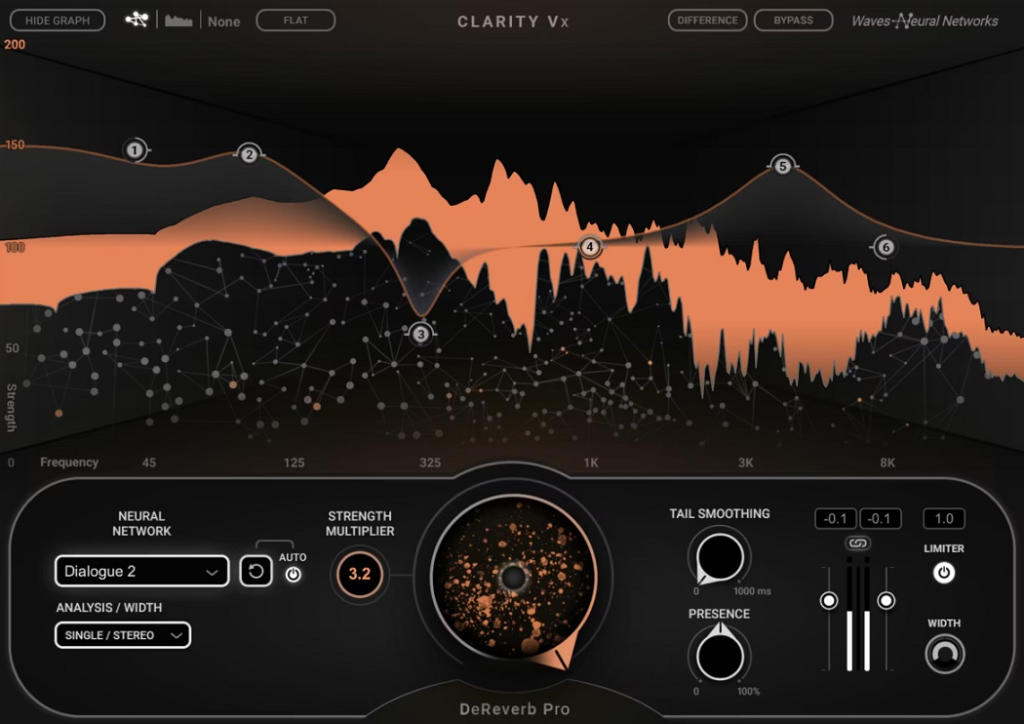
Both the standard and Pro versions of this plugin are on the list because they serve different needs. Clarity Vx DeReverb Pro is a much more advanced tool, offering detailed multiband control over reverb removal. It’s designed for mixing engineers, post-production professionals, or anyone who needs precise control when cleaning up difficult recordings.
The Pro version stands out for its depth. While the standard Clarity Vx DeVerb gives you a simple slider, the Pro version lets you dive in and control how reverb is treated across different frequency ranges.
Key Features
- Multiband Reverb Reduction
A key feature is the ability to control reverb removal separately across multiple frequency bands. This is especially useful when room problems aren’t spread evenly across the spectrum. For example, low mids often get muddy while highs may only need a little cleanup. By targeting each range, you can be aggressive where needed and gentle elsewhere, resulting in a more natural sound. This approach also helps keep the body and warmth of vocals while removing unwanted room resonances.
- Advanced Neural Network Processing
Building on the same AI foundation as the standard version, the Pro edition uses an enhanced neural network that delivers higher resolution processing with more detailed analysis of the reverberant signal.
I noticed that this translates to cleaner results when you’re making more aggressive moves, because the algorithm has more information to work with and can make finer distinctions between the direct sound and the room. For post-production work especially, where you might be dealing with dialogue recorded on location in really challenging spaces, that extra processing quality is the difference between usable audio and something that still sounds compromised even after treatment.
- Frequency-Specific Artifact Management
Something I realized after working with this plugin extensively is that having control over artifacts on a per-band basis completely changes how far you can push the processing. With simpler dereverb tools, there’s always this moment where you start hearing the processing fall apart, and the only option is to back off globally.
But with the Pro version, if you’re getting artifacts in one frequency range, you can ease up in just that area while maintaining strong reverb reduction everywhere else. I’d say this single capability is what justifies the price difference over the standard version for anyone doing serious audio restoration or post-production work.
- Detailed Spectral Visualization
The Pro version includes a comprehensive spectral display that shows you exactly what’s happening across the frequency spectrum in real time, and I have to say that when you’re doing detailed cleanup work, this visual feedback becomes almost as important as what you’re hearing.
It helps you identify where the reverb is most problematic before you even start adjusting controls, which makes the whole process faster and more targeted. I found myself using the visual display to guide my initial settings and then fine-tuning by ear from there, and that workflow consistently gave me better results than just going by listening alone.
- Separate Early Reflection and Tail Controls
Just like with higher-end standalone dereverb plugins, the Pro version lets you treat early reflections and the reverb tail as separate elements, giving you the ability to shape the room character rather than just reducing it uniformly. Maybe you want to keep some of the early reflections for naturalness but eliminate the long tail that’s making things sound washy.
Or maybe the early reflections are the actual problem and the tail is manageable. Either way, having these as independent controls means you can make those kinds of nuanced decisions, and I think that flexibility is essential for professional-level work where the audio quality standards are non-negotiable.
4. Acon Digital DeVerberate 3
I’ve recommended Acon Digital DeVerberate 3 for a while because it consistently delivers great results at a price that undercuts much of the competition. It combines traditional algorithmic reverb reduction with a deep learning approach, giving you two different processing engines to use separately or together, depending on your needs.
I appreciate that Acon Digital kept both algorithmic and AI options, instead of focusing only on deep learning. Each method has strengths in different situations, and this practical approach makes the plugin very versatile.
Key Features
- Dual Processing Engine Architecture
This is the feature that really defines DeVerberate 3, because you get both a classic algorithmic reverb reduction engine and a separate deep learning engine, and you can use either one on its own or combine them for more complex problems.
I found that the algorithmic engine tends to work really well on recordings with predictable, consistent reverb, while the deep learning engine excels at handling more chaotic room sounds and irregular reflections.
Having both available means you always have a fallback if one approach isn’t quite getting the results you need, and when you combine them together, the two engines cover each other’s weaknesses in a way that gives you cleaner output than either one could achieve alone. I’d say this dual approach is the main reason this plugin punches so far above its price point.
- Broadband Material Support
DeVerberate 3 is designed to handle a wide range of audio sources, not just voice. This is important if you work with music, instruments, or full mixes, since removing reverb from a piano or drum recording is different from cleaning up speech.
I found the plugin added less coloration to instruments than voice-focused competitors, and the deep learning engine did a good job of preserving natural timbre while reducing room sound.
- Automatic Reverb Profile Analysis
The plugin can automatically analyze your recording’s reverb and suggest starting settings, which removes much of the guesswork from setup. This is especially helpful if you’re new to reverb removal. I found the automatic analysis accurate on most material, and even when I made further tweaks, starting with these suggestions saved me a lot of time.
- Leveling Mode for Consistent Room Tone
I feel like this is an underrated feature that doesn’t get talked about enough, because DeVerberate 3 includes a mode specifically designed to even out inconsistent room tone across different recordings or takes.
If you’ve ever edited together dialogue from multiple takes or multiple shooting locations, you know how distracting it is when the room sound changes from cut to cut. The leveling mode addresses exactly that problem, and I found it incredibly useful for podcast editing and film post-production where consistency across edits is just as important as overall quality.
- Efficient Resource Usage
Acon Digital has optimized the plugin to run smoothly even on older hardware, without needing as much processing power as some AI-based competitors. This is important if you’re using a laptop or need to run the plugin on many tracks in a large session. Even with the deep learning engine active, I found the CPU usage stayed manageable.
- Reasonable Price Point
DeVerberate 3 offers some of the best value for money in this category. You get dual processing engines, deep learning, support for many types of material, and professional results at a much lower price than many competitors. While price isn’t everything, this level of quality at this cost makes it an easy recommendation for anyone needing reliable reverb removal without a big investment.
5. SPL De-Verb Plus
This one takes a different approach from the AI-heavy plugins on this list. It’s based on SPL’s musical, analog-inspired signal processing rather than pure algorithmic or neural network methods. This plugin is for users who want to reduce room ambience without removing all the reverb from a recording.
De-Verb Plus by SPL feels more like a mixing tool than a restoration tool. It’s less about fixing a bad recording and more about shaping the amount of room sound in a track that’s already decent.
- Musically-Oriented Reverb Reduction
The core philosophy behind this plugin is that reverb reduction should sound natural and musical rather than clinical, and you can hear that in how it processes audio. Where some dereverb plugins can make things sound sterile or artificially dry when you push them, the De-Verb Plus tends to maintain a sense of space and life even as it pulls back the room sound.
I found that this character makes it particularly well-suited for music production, where you want to tighten up a recording without completely killing the vibe, like reducing room ambience on a drum recording while still keeping it sounding like real drums in a real space rather than samples triggered in a vacuum.
- Straightforward Control Set
SPL kept the interface simple, giving you just the controls you need to shape reverb reduction without extra options. This means you spend less time tweaking and more time mixing. For engineers who want a tool that responds predictably, this streamlined design is more useful than having lots of unused parameters. It’s a smart choice for a tool you’ll use quickly during busy sessions.
- Frequency-Dependent Processing
Even with a simple interface, the plugin treats different frequency ranges differently when reducing reverb. This helps avoid problems like thinning out the low end or making the highs sound brittle. I found that this frequency-dependent processing keeps the body and fullness of vocals and instruments, even when removing a lot of room sound. As a result, tracks fit better in the mix without needing extra EQ.
- Analog-Style Signal Path
SPL’s analog background influences how this plugin processes audio, giving it a warmer and more forgiving character than purely digital solutions. It doesn’t add unnecessary coloration, but the processing is smooth and avoids the harsh digital artifacts that can come with aggressive dereverb. This is a good choice if you care about how the processing sounds as much as how much reverb it removes.
- Works Well as a Mix Shaping Tool
De-Verb Plus works as both a creative and a corrective mixing tool. You can use it to adjust the amount of room presence in any track, almost like a room ambience fader. This changed how I used the plugin; it became a tool I reached for to shape the space in my mix, not just to fix bad recordings.
6. Zynaptiq UNVEIL
The last plugin I’ll cover is Zynaptiq UNVEIL, which stands out because it works differently from the others. UNVEIL uses real-time signal unmixing, a unique approach compared to standard reverb reduction algorithms or neural networks. Instead of just suppressing reverb, it separates the reverberant and direct parts of your signal, letting you rebalance them as you like.
This changes the workflow, since you’re not just removing reverb. You’re adjusting the balance between the source and the surrounding space, which opens up creative options beyond simple cleanup.
Key Features
- Real-Time Signal Unmixing Technology
I have to say, this is the feature that makes UNVEIL genuinely unique in this category, because the signal unmixing approach treats reverb and direct sound as separate elements that can be independently controlled rather than simply trying to suppress one or the other. What this means practically is that you can reduce reverb, boost it, reshape it, or use the focus control to bring the direct signal forward without removing the room sound entirely.
I found that this flexibility gave me options that traditional de-verb plugins simply don’t offer, especially when I wanted to change the character of the space rather than eliminate it completely. The technology behind it is complex, but the result is surprisingly intuitive once you understand that you’re adjusting a balance rather than applying a fixed amount of removal.
- Focus Control for Source Clarity
This is probably the control you’ll use most often, and it works by adjusting the perceived distance and clarity of the source within its acoustic environment. Turning it one direction brings the source forward and makes it sound closer and more present, while going the other way pushes it back into the room.
I’d say this is more musically useful than a simple reverb reduction slider because it preserves the relationship between the source and the space in a way that sounds natural at any setting.
I noticed that even extreme adjustments didn’t produce the kind of hollow, processed sound you get when you push most dereverb plugins too hard, which I think speaks to how fundamentally different the underlying technology is.
- Adaptive Processing That Responds to Your Signal
UNVEIL’s processing adapts dynamically to your audio, instead of using a fixed curve. Quieter, more exposed sections get different treatment than louder, denser parts, resulting in more consistent and transparent processing. This is especially helpful for dialogue and vocals with varying levels, since the plugin handles changes smoothly without needing constant adjustment.
- Beyond Voice and Dialogue
Unlike many dereverb plugins focused on speech, UNVEIL works well with music, sound effects, and complex audio sources. You can use it on live concerts, sound design, and film ambiences, and it always delivers usable results, no matter how complex the source. This versatility stems from its unmixing approach, which is more flexible than algorithms trained primarily on a single audio type.
- Resynthesis Quality Controls
UNVEIL lets you adjust the quality of the resynthesized signal after unmixing, so you can choose between maximum transparency and lower CPU usage. This is helpful because sometimes you need the cleanest result for a critical project, and other times you just need quick cleanup at a lower CPU cost. This flexibility shows Zynaptiq understands real-world production needs.
- Creative Sound Design Applications
UNVEIL is useful for more than just cleaning up recordings. By rebalancing the reverberant and direct parts, you can create a range of creative effects. For example, you can make a dry recording sound like it was made in a bigger space or create unique textures by pushing the unmixing further. Once I started using it as a creative tool, not just for correction, it became one of my favorite sound design plugins. Its dual role as both a problem-solver and creative tool makes it truly unique.
I created ModulateBass to share the latest updates on top-quality plugins with you. Most plugins featured here offer trial versions, and when you buy through retailers like PluginBoutique, Native Instruments, or Plugin Alliance, you help keep this site running through commissions without paying anything extra.
I only showcase plugins I actually use or would genuinely choose for my own work. Price tags don’t influence my recommendations. If I love a plugin, I’ll feature it regardless of cost. For pricier options, I always suggest trying the demo first when possible. Trial versions typically include full functionality, giving you a complete experience before committing. I hope my content proves valuable for your needs. Thanks for stopping by.