If your mixes ever seem to lack energy or definition, exciter plugins could be what you’re missing. Many producers skip them, thinking EQ does the same thing, but exciters actually work differently. Rather than just boosting existing frequencies, they create new harmonics from your signal. This usually sounds more natural and musical than simply raising the highs. Once you see the difference, it can really change how you approach clarity and presence in your tracks.
The exciter plugin market has become much more interesting lately, with far more choices than before. Now, you can find plugins made for mastering, bus processing, individual tracks, and even some great free options. My goal with this list is to highlight seven exciter plugins that give you real results without making things complicated or expensive.
Each plugin has its own strengths, so the best one for you depends on your workflow and what your mixes need.
In my experience, the biggest mistake with exciters is using them all the same way. A plugin that works great on vocals might not suit your drum bus, and a mastering tool can be too subtle for a single track.
That’s why I included a range of options here, from vintage analog styles to clean modern ones, so you can find what fits your needs. Even having one or two of these plugins can really improve how your mixes sound, and once you try them, you’ll probably wonder how you managed without them.
1. Waves Aphex Vintage Aural Exciter
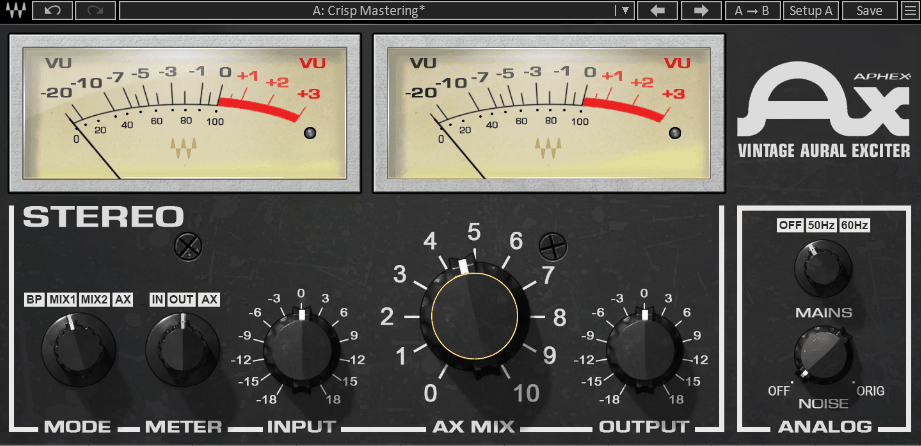
Here’s what I’ve found with the Waves Aphex Vintage Aural Exciter: you really notice its value when it brings a dull track to life. This plugin is a recreation of the classic Aphex Aural Exciter hardware, which studios used for years to make tracks stand out without simply turning up the volume.
You’re not just boosting a frequency shelf here. The plugin creates new harmonic overtones from your input signal, so the result sounds natural instead of artificial.
I find it works best on vocals or anything that needs to stand out in a busy mix, since that’s where I hear the biggest improvement. It adds presence and clarity to your tracks in a way that’s tough to match with other tools.
Here is what you get:
- Analog-Modeled Harmonic Generation
This plugin recreates the original Aphex exciter circuit, so it actually creates new upper harmonics instead of just boosting what’s already there. I’ve found this gives you musical brightness and clarity, even when you use it heavily, because the harmonics respond to your input signal.
In short, the effect adapts to your audio in a way that static EQ can’t, which is why it sounds so natural on many types of tracks.
- Separate Ax Mix and Mode Controls
The Ax Mix knob lets you precisely blend the processed signal with your original audio, so you’re not limited to just one sound. The Mode selector also changes the character of the effect, letting you choose between a brighter, more aggressive sound or a subtle, warm one.
These two controls work well together, giving you the flexibility to adjust the effect for vocals, guitars, full mixes, or anything else, without needing extra plugins.
- Tune Control for Frequency Targeting
The Tune knob is an underrated feature, since it lets you pick the frequency range where the harmonics are added. This way, you can target just the area that needs help, like adding air to vocals or highlighting the pick attack on an acoustic guitar.
In my view, this control is what helps you get a polished, mix-ready sound instead of something harsh. I recommend experimenting with it on every track you use.
- Noise Reduction Section
This detail shows that Waves paid attention to the original hardware’s features. The plugin has a built-in noise gate to keep your signal clean, especially when you use more excitation and risk bringing up hiss or noise.
This is very practical for less-than-perfect recordings, since you can use more of the effect without worrying about boosting unwanted noise.
- Peaking and Shelving Filter Options
The plugin lets you switch between peaking and shelving filter modes in the exciter circuit, which changes how wide or focused the harmonic effect is.
The shelving option works well on full mixes or buses for a broad, even boost, while the peaking mode is great for detailed work on individual tracks where you want the effect focused in one area.
- Minimal CPU Usage and Low Latency
This plugin uses very little CPU and adds almost no latency, so you can run many instances in a big session without slowing down your DAW. That’s why I often use it on individual tracks instead of just on a bus.
- Vintage-Accurate Interface Design
I like how Waves matched the look and feel of the original hardware in the plugin’s interface. If you’ve used the real thing, it feels familiar, but even if you haven’t, the layout is simple and easy to understand.
2. Arturia Bus EXCITER-104
The Arturia Bus EXCITER-104 really surprised me. At first, I didn’t expect much since Arturia already offers so many plugins, but after trying it on my buses, I saw its value. This exciter is made for bus processing and uses Arturia’s analog modeling skills, which sets it apart from basic brightening tools. It’s designed for grouped signals and full mixes, so the way it handles harmonics stays balanced and controlled, even with complex stereo material.
What sets this exciter apart is its flexibility. It can sound very transparent when needed, or become more aggressive if you push it. I like this dual nature because different buses need different approaches. For example, a drum bus might need more grit, while a vocal bus often needs a smoother touch. The EXCITER-104 handles both easily.
- Three Distinct Exciter Modes
I like that you aren’t limited to just one type of harmonic enhancement. The plugin offers three different exciter modes, each with its own sound, so you can choose what fits your material best. Switching modes on different buses really changes the mix, making it feel like you have three tools in one.
- High and Low Band Processing
This feature is especially practical because the EXCITER-104 lets you process high and low frequencies separately. You can add brightness to the highs and warmth to the lows at the same time. In my experience, this dual-band control gives you more flexibility than most single-band exciters, which is great for precise work on the master bus.
- Built onArturia’s Analog Modeling Technology
Arturia is known for recreating vintage hardware, and that expertise is clear in this plugin. The harmonics sound warm and musically accurate, much like real analog gear. This is especially noticeable in the midrange, where some other exciters can sound harsh. As a result, the processed sound blends naturally into the mix instead of feeling artificial.
- Dry/Wet Mix Control with Visual Feedback
Having a dedicated mix knob and clear metering really helps when working on buses, since it’s easy to add too much excitation across several tracks. The visual feedback helps you keep things in check, and I suggest using it to compare your settings often. This level of control makes the plugin reliable for mix bus use.
- Tone Shaping Controls
Besides the exciter, the plugin has tone controls that let you adjust the overall sound of the processed signal. You can fine-tune how the effect works with your material without needing a separate EQ. This makes your workflow smoother and keeps your plugin chain simpler, especially when working with many buses.
- Optimizedfor Bus and Mix Processing
It’s important to note that not all exciters are made for bus processing. The EXCITER-104 is designed to handle summed signals without causing phase problems or unwanted artifacts. This means your enhancements sound cohesive across the whole bus, instead of making certain elements stand out in an unnatural way.
- Lightweight and DAW-Friendly
The plugin is also very efficient on CPU, which is important if you use it on several buses at once. There’s nothing more frustrating than a plugin slowing down your session. The EXCITER-104 avoids this problem, letting you focus on mixing instead of worrying about your computer’s performance.
3. Softube Weiss Exciter
In my opinion, the Softube Weiss Exciter is one of the more understated plugins here, and that’s part of what makes it so effective. It was developed by Softube in partnership with Weiss Engineering, a company known for its trusted hardware in top mastering studios. You can really tell this background influences the plugin, as it feels precise and controlled, offering mastering-level quality without being difficult to use.
Right away, I noticed this exciter doesn’t hit you with obvious effects. Instead, it adds presence and clarity in a subtle way; you only realize what it’s doing when you turn it off and notice what’s missing. That seems to sum up the Weiss approach. I find it works best for adding a final polish to vocals, a mix bus, or any track where you want improvement without harshness.
Many engineers choose this plugin because it allows for subtle adjustments that still make a real difference, which isn’t as easy as it sounds.
- Mastering-Grade Harmonic Processing
The Weiss Exciter is built on algorithms from the Weiss DS1-MK3 hardware, a staple in top mastering studios. This gives it a noticeable level of refinement, especially when compared to more aggressive exciters on delicate tracks like acoustic instruments or final mixes. The harmonics it adds remain clean and transparent, even at higher settings, which is ideal for material that’s already been carefully mixed and just needs a finishing touch.
- Streamlined Interface with Purpose-Built Controls
I appreciate that the plugin keeps things simple, offering only the controls you actually need for excitation. Every knob and parameter has a clear purpose and real impact on the sound. This straightforward design helps you work faster and make decisions quickly, since you’re not distracted by unnecessary options. You can just make a few tweaks and move on.
- Multiband Frequency Targeting
This feature takes the plugin beyond a basic exciter by letting you target specific frequency ranges for harmonic enhancement, instead of processing the whole signal the same way. For example, if your mix needs more brightness in the highs but the mids are already balanced, you can adjust just the top end without affecting the rest. This kind of precision is what makes it feel like a true mastering tool and why it’s so reliable for important projects.
- Part of the Softube Weiss Ecosystem
Another highlight is how well the Exciter works with other Softube Weiss plugins, like their compressor, deesser, and EQ. If you already use these tools, your workflow stays consistent and the design feels familiar. Over time, this kind of consistency can really help you work more efficiently, which is worth considering if you’re setting up a mastering chain.
- Low Latency Performance
I think people often overlook this, but the Weiss Exciter has very low latency, so you can use it during tracking and real-time monitoring without issues. I found it helpful for hearing how the final master might sound while still recording or arranging. Plus, your DAW’s delay compensation doesn’t have to work as hard, keeping sessions tight and responsive even with many plugins running.
- Transparent Saturation Character
Unlike more colorful exciters, this plugin adds saturation that stays transparent instead of changing the sound’s character. Many exciters seem designed to be noticed, but the Weiss focuses on adding warmth and harmonic richness that supports the original material. I recommend it when you want enhancement but can’t risk altering the sound you’ve already created.
4. Slate Digital FG-36A
The Slate Digital FG-36A is a plugin that deserves more attention, since it quietly does its job without drawing much notice. It’s an exciter based on a classic analog hardware unit, designed to add presence and definition to recordings in a musical way. In my experience, Slate captured the character of the original well, and the plugin fits naturally in your channel strip with your EQ and compressor, without interfering with them.
The FG-36A works best on individual tracks, though it can also be used on buses if you use it carefully. It brings out detail in a source without making it sound exaggerated or fake, which is difficult for most exciters. Vocals, acoustic guitars, drum overheads, and piano recordings all benefit from this plugin. The key is that it enhances the strengths of your recording instead of covering up flaws.
It seems Slate designed this plugin for engineers who want quick results without spending a lot of time adjusting settings, and I appreciate that.
- Analog Circuit Modeling
The core of this plugin is Slate’s modeling of the original hardware’s analog exciter circuit, which you can hear in how the harmonics respond to your input. Unlike a static processor, the harmonic content changes and reacts to what you put in. This makes a big difference when working with tracks that have a lot of dynamic range. This responsive behavior is what sets a well-modeled plugin apart from one that just adds a fixed harmonic layer.
- Simple and Direct Control Layout
Slate kept the interface simple, with only the controls you need to shape the excitation effect. There are no submenus or confusing parameters to figure out late at night. Everything is easy to find, and most engineers can get a good sound within thirty seconds. This efficiency is valuable, especially during sessions when keeping creative momentum is more important than adjusting plugins.
- Mix Knob for Parallel Blending
The mix control might seem basic, but it makes the plugin much more useful in practice. It lets you blend the processed signal with your dry audio, so you can use more of the effect without it becoming too strong. In my experience, setting the mix to about 30 or 40 percent gives you a clear enhancement that fits well in the mix without standing out.
- Versatile Source Compatibility
One thing I really like about this plugin is that it works well on many different types of source material without needing big changes to the settings. I’ve used it on lead vocals, room mics, and synth pads, and it always added something useful without causing issues. Many exciters only sound good on certain sources, but this one is more consistent.
- Integration with the Slate Digital Ecosystem
If you already use Slate plugins, the FG-36A fits easily into the Virtual Mix Rack or your existing Slate setup. This consistency in workflow and interface helps you make decisions faster. It also means you don’t have to switch between different plugin layouts while you’re focused on mixing.
- CPU Efficient Across Large Sessions
The FG-36A uses very little CPU, so you can run it on many channels at once without slowing down your session. This means you don’t have to worry about where to use it or bounce tracks to save processing power. This is especially helpful if you like to use an exciter on several individual tracks instead of just on the bus, which is where I think this plugin sounds best.
5. Slate Digital Fresh Air (Free)
This one is free, which is important to mention first because it sets different expectations. Since you don’t have to pay to try it, there’s no risk. Fresh Air is simple: it adds high-frequency presence and air to your tracks with just two bands. You don’t need to learn complicated controls or read a manual. I found it works best when you want a quick boost on vocals or a mix bus, just a touch of brightness to make things sound more open and clear.
The main thing to know about Fresh Air is that it isn’t meant to replace full-featured exciters. It’s a utility plugin focused on one job, and it does that job well enough that you might use it more often than you think.
- Vocal-Friendly Character
Fresh Air has a sound that feels made for vocals, which is probably intentional since most people use it that way. It adds presence without making things sound harsh or sibilant, which is exactly what you want from a free brightness tool. It also works on other sources, but don’t expect the depth or flexibility of a paid exciter.
- Lightweight and Instant
The plugin uses very little CPU and loads almost instantly in any major DAW.
- Works as a Starting Point
Fresh Air is a good way to try out what exciter plugins can do for your mixes, especially if you haven’t used one before. It lets you experience high-end enhancement without spending any money, which is helpful for new producers still learning what tools they need. When you’re ready for more, you’ll know what to look for in a paid plugin.
6. Black Salt Audio Oxygen
If you’re looking for an exciter that fits today’s production needs, Black Salt Audio Oxygen stands out. It doesn’t try to copy old hardware or chase vintage vibes. Instead, it’s a modern exciter built for how producers work now. I like that the controls and sound focus on practical results, not just recreating the past.
What makes this plugin different is that you don’t have to be overly careful with it. You can push the settings and it still sounds musical without breaking up or adding unwanted noise. I noticed this especially on synth-heavy and electronic tracks with lots of high frequencies. For me, that reliability is more important than a long list of features because it means you can count on it when you’re finishing a mix.
It strikes a good balance: powerful enough for serious projects, but easy to use so you don’t spend your session figuring it out.
- Multi-Algorithm Excitation Engine
Oxygen offers several excitation algorithms, each with its own unique sound. This means you aren’t limited to one type of enhancement and hoping it fits every track. Having these choices made it much easier for me to match the processing to different sources, like a busy synth bus or a simple vocal. The plugin adapts to your needs instead of making you adjust your workflow.
- Visual Waveform and Spectral Display
At first, I didn’t think I’d use the real-time visual feedback, but it quickly became helpful. The plugin shows you exactly how the excitation affects your signal, and seeing the harmonic content helps you make decisions faster. I found this especially useful when working at low volumes or on laptop speakers, where you can’t always hear every detail.
- Built-In Saturation Stage
After using Oxygen for some time, I noticed the built-in saturation section adds a lot to the plugin. It’s well integrated, not just an extra feature. The saturation and excitation work together, letting you go from gentle warmth to strong harmonic distortion without needing another plugin. I like this because it keeps your setup simple and gives you more tonal options in one place.
- Modern UI That Actually Helps You Work
I usually don’t focus on how a plugin looks, but Oxygen’s interface really helps you work faster. Everything is clear, the controls respond well, and you can always find what you need. When you’re using it on many tracks in a session, this thoughtful design saves time and keeps you working instead of searching for controls.
- Low Resource Footprint
Oxygen is efficient with CPU, so you can run several instances without slowing down your session. This is important if you want to use exciters on individual tracks, not just on a bus. Even in big projects, the plugin never caused problems for me. I value this reliability because you don’t want your DAW to lag from one plugin using too many resources.
7. Techivation M-Exciter
I included the Techivation M-Exciter here because Techivation has been steadily releasing focused, well-made processing tools that many producers might not know about yet. The M-Exciter is a harmonic exciter that adds clarity, presence, and brightness to your tracks while keeping everything controlled and musical. If you value quality over quantity in your plugins, this focused approach makes it worth checking out.
What first caught my attention is that this plugin doesn’t try to do everything at once. It focuses on its main purpose, which makes it more useful than plugins that combine too many features into a complicated interface. After using it for a while, I found the results to be clean and reliable. You can set it up and trust that it’s working as expected. This kind of transparency is really helpful when you’re mixing and need to make quick, confident choices.
- Harmonic Excitation with Musical Character
The M-Exciter uses a harmonic generation engine that creates overtones which sound natural and blend well with the original signal. This musical quality sets it apart from cheaper exciters that can make tracks sound thin or digital. Even when you use stronger settings, the harmonics stay warm and smooth, so your tracks sound polished instead of tiring. This is especially important for material you’ll listen to often during a session, since harsh exciters can quickly wear out your ears, but the M-Exciter avoids that issue.
- Dedicated High and Low Frequency Controls
This feature makes the plugin especially useful in real mixing situations because you get separate controls for the high and low frequency ranges. Instead of applying the same effect everywhere, you can add brightness to the top end while keeping the low end warm and tight. In my experience, this dual control gives you much more flexibility than a single-knob exciter. For example, a vocal might need more sparkle in the highs but not in the lows, and the M-Exciter lets you handle that without needing extra plugins.
- Adjustable Frequency Targeting
Another helpful feature is the ability to fine-tune which frequency ranges the excitation affects, so you’re not stuck with preset settings for brightness or warmth. This lets you adjust the effect to fit the unique sound of each track, since a lead vocal and a drum bus have very different frequency needs. I found that taking a little extra time to set the frequency targeting made the results sound more natural and helped avoid overprocessing parts of the mix that already sounded good.
- Clean and Minimal Interface
I like that Techivation kept the visual design simple. The plugin’s layout is clear, with everything you need right in front of you, so you don’t have to search through tabs or hidden menus. This made it quicker for me to get results, which is important when you have lots of tracks to work on. The interface respects your time and assumes you know what you’re doing. I think more plugin developers could learn from this approach.
- Smooth High-End Character
After using the M-Exciter in different sessions and on various sources, I noticed that its high-frequency excitation stays smooth even at higher settings. Many exciters can sound harsh or tiring in the upper range, but this one adds air and sparkle while remaining easy to listen to for long periods. If you’ve had problems with sibilance or harshness in other exciters, I’d recommend trying the M-Exciter. It handles the upper range with care, which is rare at this price, and your ears will appreciate it during long mixing sessions.
- Works Well Across the Entire Signal Chain
One of the most useful things about the M-Exciter is that it works well on everything—from a single vocal track to a guitar bus, a synth pad, or even your master output. Its controls are flexible enough that you can adjust it for different uses, making it feel like a new tool each time. Because of this, one license really does cover all your needs, so you don’t have to buy extra plugins for specific situations. That versatility makes it a smart choice for producers who want one reliable tool instead of several average ones.
I created ModulateBass to share the latest updates on top-quality plugins with you. Most plugins featured here offer trial versions, and when you buy through retailers like PluginBoutique, Native Instruments, or Plugin Alliance, you help keep this site running through commissions without paying anything extra.
I only showcase plugins I actually use or would genuinely choose for my own work. Price tags don’t influence my recommendations. If I love a plugin, I’ll feature it regardless of cost. For pricier options, I always suggest trying the demo first when possible. Trial versions typically include full functionality, giving you a complete experience before committing. I hope my content proves valuable for your needs. Thanks for stopping by.