Noise gates are one of those mixing tools that seem straightforward until you actually need to use one on a messy recording. I’ve spent plenty of time dealing with unwanted bleed, room noise, and handling between vocal phrases, and I can tell you that finding a gate that works well without making your tracks sound chopped up and lifeless takes some trial and error.
The right gate should be transparent when you need it to be, precise enough to handle tricky material, and fast enough to not slow down your workflow when you’re gating multiple tracks.
In this roundup, I’m covering eight solid noise gate plugins that handle everything from basic noise cleanup to more advanced applications.
I’ve got Oxford Drum Gate 2 for drum-specific processing, SSL X-Gate with its comprehensive visual workflow, FabFilter Pro-G for transparent multiband gating, Black Salt Audio Silencer for straightforward operation, Antelope Audio x904 as a budget-friendly option, and Boz Digital Labs Gatey Watey for simplified frequency-dependent control.
Whether you’re cleaning up drum tracks, tightening vocals, or dealing with noisy guitar recordings, there’s something here that’ll fit your workflow and budget. Let’s get into what each one offers and where they actually shine.
1. Oxford Drum Gate 2
Oxford Drum Gate 2 from Sonnox is a latest gate plugin designed specifically for drum processing, and it’s honestly one of the most precise tools I’ve used for cleaning up multi-mic drum recordings.
Unlike those generic gates that try to do it all, this plugin is laser-focused on the real problems you get with drums like bleed, phase issues, and timing headaches. In my experience, Oxford Drum Gate 2 just gets it right, because it actually understands how drum mics behave in real sessions. Honestly, it’s way better at handling these issues than any standard gate I’ve tried.
What I really love about this plugin is how smart it is with gating. You’re not just setting a threshold and crossing your finger, it actually analyzes the transients of your drum hits and makes decisions based on that.
The biggest difference between this and a regular gate is that it actually analyzes the attack profile of your drums and adjusts itself. In my experience, you can gate super aggressively without killing the natural decay of cymbals or the room tone that makes drums sound alive. Plus, it barely touches your CPU. I’ve run this on every single drum mic in a session and never had any performance issues.
- Drum-Specific Processing Algorithm
At the heart of Oxford Drum Gate 2 is its drum-aware processing engine. Instead of just looking at amplitude, it actually analyzes the transient shape. I threw it on a snare track with loads of hi hat spill, and the gate opened perfectly for the snare hits without chattering during the hi hat like a normal gate would.
The attack detection looks at the shape of the incoming transient and adjusts how it opens. From what I can tell, this is why you can use pretty much the same settings across different drum elements and still get natural results.
- Depth and Range Controls
Instead of just a basic on/off gate, you get a variable depth control that lets you decide exactly how much bleed you want to cut. This is huge for drums, because sometimes you don’t want total silence between hits. You just want to knock the bleed down by 10 or 15 dB to clean things up, but still keep it sounding natural.
I usually set the depth around 50 to 70% on close mics, and about 30 to 40% on overheads. What really stands out is how transparent it sounds, even when you push it hard.
- Hysteresis and Hold Time
Oxford Drum Gate 2 gives you separate open and close thresholds, so you get proper hysteresis. This stops the gate from flickering when signals hover near the threshold, which is a lifesaver on snare drums with ghost notes and rim shots.
The hold time sets how long the gate stays open after the signal drops below the close threshold. I usually go for 50 to 150 milliseconds, depending on the drum and the tempo. The hold control in this plugin is very musical, as it never sounds like it’s chopping off the tail in a weird way.
2. SSL X-Gate
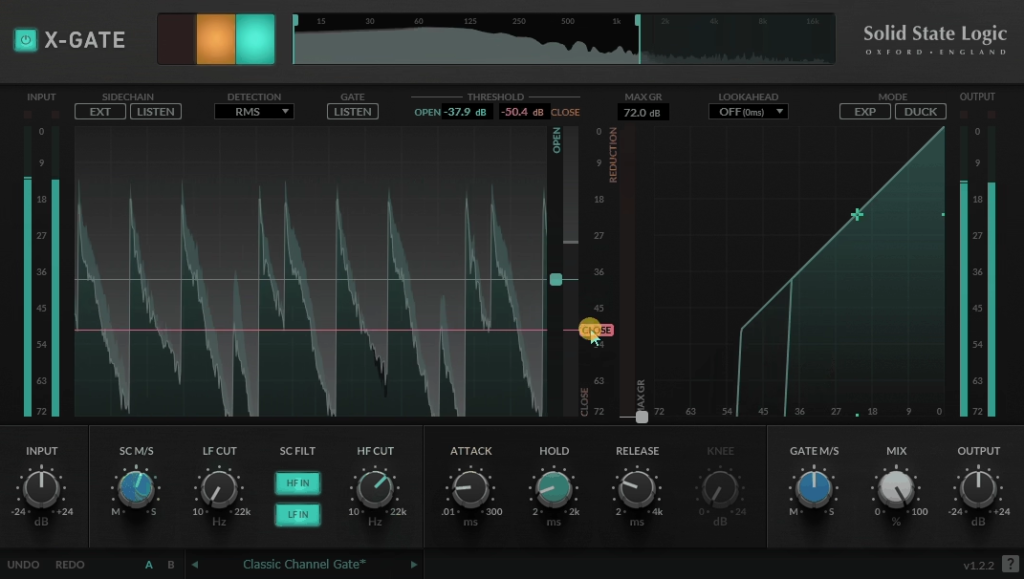
SSL really knows its stuff when it comes to digital broadcast consoles, and you can tell with X-Gate. This thing is built for situations where you can’t afford to mess up, like live shows or broadcast gigs where every detail matters.
What really sets X-Gate apart is how it nails both precision and workflow. You get a rolling waveform display, separate open and close thresholds, advanced sidechain filtering, and a bunch of different modes that go way beyond your standard noise gate.
I’ve been using it on everything from cleaning up drum recordings with bleed issues to managing dialogue tracks and even creative gating effects on synths and guitars. The learning curve is pretty minimal because everything is laid out logically from left to right, following the signal path.
- Advanced Sidechain Filtering
The sidechain section includes high and low-pass filters, with a super handy interactive graph. For kicks or toms, I usually high pass the sidechain around 80 to 100 Hz so the gate only reacts to the hits and ignores all that low-end rumble.
The mid/side control lets you gate either the center or the stereo parts of your audio. This helps when you want to clean up dialogue in the center without touching the room sound on the sides, or when you want to keep the stereo image of drum overheads while cutting down on bleed.
- Expander and Duck Modes
X-Gate also has an Expander mode with knee control. Instead of switching the sound on or off, the expander lowers the volume gradually when the signal drops below the threshold. This gives a more natural sound on vocals or acoustic instruments where hard gating can be distracting.
The knee setting controls how smooth the transition is. Duck mode works the opposite way, lowering the volume when the signal goes above the threshold instead of below. With your DAW’s external sidechain, you can use this to lower a bass track when the kick drum hits or reduce pads when vocals start.
I’ve used duck mode for creative pumping effects and to make music automatically reducewhen someone is speaking in dialogue.
3. FabFilter Pro-G
FabFilter Pro-G is a transparent noise gate that prioritizes workflow and sound quality over unnecessary features. When working with a full mix and needing to gate multiple tracks quickly, having a plugin that just works without extra thought is refreshing.
I found that Pro-G strikes a good balance between being simple enough to use fast and detailed enough to handle tricky gating situations where precision matters.
The interface follows FabFilter’s typical approach, with everything laid out visually so you can see what’s happening to your audio. This is their biggest strength across all their plugins, as you’re not blind to what the processing is doing.
- Intelligent Processing Modes
Pro-G offers different processing modes that change how the gate behaves. Gate mode is standard on/off, Expander mode provides gentler dynamic reduction, and Ducking mode attenuates the signal when it exceeds the threshold.
Having these modes in one plugin means you don’t need separate tools for different tasks. I use Expander mode most often because it sounds more natural than hard gating. Instead of silence between drum hits, you get gradual reduction that keeps some room tone. This also works well on vocals where hard gating would sound obvious and unnatural.
- Visual Feedback and Display
The spectrum analyzer shows your input signal’s frequency content in real time, which helps when you’re setting up sidechain filtering and you can also see exactly what frequencies are triggering the gate and adjust your filters accordingly.
- Advanced Sidechain Filtering
The sidechain section includes high-pass and low-pass filters with adjustable slopes up to 96 dB per octave. When gating kick drums, I typically high-pass the sidechain around 70 to 90 Hz to remove subsonic rumble that might false-trigger the gate. The steep filter slopes let you be precise about what frequency range controls the gate. Using 48 dB per octave slopes works well for most situations, with steeper slopes available if you need surgical precision.
- Precise Timing Controls
The attack and release controls shape how the gate opens and closes. Use fast attack for drums when you want immediate response, and slower attack for a softer gate action. I usually keep attack times under 5 milliseconds for percussive material and 10 to 20 milliseconds for vocals or sustained instruments.
The hold time determines how long the gate stays open after the signal drops below the threshold, which is critical for letting drum hits ring out naturally. What I like about Pro-G’s timing controls is how they interact smoothly. You’re not fighting against the plugin to get natural-sounding results.
The release shaping is particularly good and does not sound abrupt or artificial even with fast release times. Setting release times between 50 and 200 milliseconds covers most gating situations, though you might go longer for material with a lot of natural decay like room mics or piano.
- Range and Knee Controls
The range control sets the maximum amount of gain reduction when the gate is closed. Instead of complete silence, you can reduce the signal by 10, 20, or 30 dB to clean things up without making it sound gated. This is one of the most important controls on any gate because full silence between hits almost always sounds unnatural. Setting the range to around 15 to 25 dB usually gives you effective noise reduction while keeping some ambience.
The knee control adjusts how gradually the gate transitions between open and closed states. A hard knee means the gate switches on and off abruptly, while a soft knee creates a smoother transition.
4. Black Salt Audio Silencer
Noise gates are tools you often overlook until you spend twenty minutes wrestling with a bad one to clean up a snare track. Black Salt Audio Silencer approaches gating differently than most plugins, focusing on making the process fast and musical instead of offering every possible control. The plugin is built around the idea that gating should be intuitive, and that philosophy shows in how quickly you can dial in useful settings.
The plugin uses intelligent detection that analyzes your audio’s characteristics and helps the gate make better decisions about when to open and close. You still have full control, but the gate seems to understand your intent.
- Intelligent Gate Processing
The core of Silencer is its smart detection algorithm that analyzes your audio’s transient characteristics rather than just looking at amplitude levels. This means the gate understands the difference between a snare hit and random bleed from cymbals. I found that when I set it up on drum tracks, the gate opened cleanly for the intended hits but didn’t chatter or false-trigger on background noise. The processing is transparent, even with aggressive settings. You’re not hearing artifacts or unnatural cutoffs that make it obvious you’re using a gate.
- Range and Depth Control
The range control sets how much gain reduction happens when the gate closes. Instead of complete silence, you can reduce the level by 15 or 20 dB to clean things up without making it obvious you’re using a gate.
This is the most musical way to use any gate, because total silence between hits almost always sounds unnatural unless you want a specific effect. The depth can be adjusted from subtle reduction to full gating depending on your material. Keeping some natural ambience is almost always better than complete silence.
- Sidechain Filtering
Silencer includes sidechain filtering that lets you shape which frequencies trigger the gate. When I work on toms or kick drums, I high-pass the sidechain around 60 to 80 Hz so the gate ignores low-frequency rumble and only responds to the actual drum hit.
The filters are simple, just high-pass and low-pass with adjustable cutoff frequencies, but that’s all you need for most gating tasks, really. Having these filters prevents false triggering, when the gate opens for the wrong reasons like handling noise or bleed from other mics. You can also route an external sidechain if you want the gate triggered by a different source.
5. Antelope Audio x904
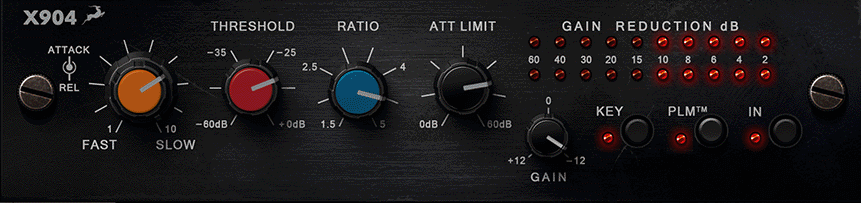
You don’t need to spend a lot or deal with complex setups to get a good noise gate. The Antelope Audio x904 is simple to use and gives you just the controls you need, without extra features you’ll likely ignore.
I’ve used this gate for cleaning up guitar tracks and tightening drum recordings. It works well for both fixing problems and creative gating, especially considering its price.
The sidechain section has high-pass and low-pass filters to control which frequencies trigger the gate. This helps avoid false triggers. For example, when gating a floor tom, I set the high-pass filter around 50 to 70 Hz so the gate ignores kick drum bleed and low rumbles. On snare tracks with lots of hi-hat bleed, I use a low-pass filter around 8 to 10 kHz to cut down on cymbal noise.
I’ve found that sidechain filtering is what makes the difference between average gating and truly clean, professional results. Without it, you end up fighting false triggers and unwanted gate openings. The x904 keeps things simple with its filters, which I like. You don’t have to sort through dozens of filter types or steep settings, just basic filters that work. For most gating needs, that’s really all you need.
- Clean and Transparent Processing
The x904 is designed to be transparent and musical, not to add its own sound. When you gate a snare drum or clean up a vocal, you want the gate to work without being noticeable.
- Key Gate Controls
The threshold sets the level that opens the gate. Sounds above this level pass through, while those below are reduced. I usually start with the threshold just above my recording’s noise floor and adjust as needed.
The attack control determines how fast the gate opens once triggered. For drums and percussion, you want fast attack times around 0.5 to 2 milliseconds, so you don’t lose the punch of the hit. For vocals or sustained instruments, you might use a slower attack around 5 to 10 milliseconds for a more natural sound.
Hold time is one of the most important gate controls. It sets how long the gate stays open after the signal drops below the threshold. Many people overlook this, but setting hold time correctly makes gating sound smooth instead of choppy.
- Range and Gain Reduction
The range control decides how much the signal is reduced when the gate is closed. Many home producers set the range to maximum and end up with lifeless tracks. Usually, you don’t want total silence between hits unless you want a special effect. I set the range to reduce by 15 to 25 dB, which cleans up noise and bleed without making the gate obvious.
I like how smooth the x904’s range control feels. Even with reductions of 20 or 30 dB, the change doesn’t sound harsh. For vocals, I use a gentler reduction of about 10 to 15 dB to keep things natural while cleaning up mouth noise and breaths. For drums, where you want a tighter sound, you can set the range higher.
- Practical Workflow Features
The x904 includes a few workflow features that make it easier to use in real sessions. The visual feedback shows you when the gate is open or closed, and the gain reduction meter tells you how much attenuation is happening.
6. Boz Digital Labs Gatey Watey
If gates with endless knobs and technical controls have ever intimidated you, Boz Digital Labs Gatey Watey is the opposite. This plugin keeps things simple, so using it feels more like turning a few knobs until it sounds right instead of doing complex engineering.
Gatey Watey is great when you need to clean up audio quickly without getting stuck in technical details or spending a lot of time adjusting settings.
The whole interface is built around simplicity. You get a big center knob that controls the main gating action, and honestly, that’s where you’ll do most of your work. Boz Digital designed this to be intuitive, so instead of thinking about thresholds and ratios, you’re just turning a knob and listening to whether it sounds good or not.
Sometimes, that’s exactly what you need, especially when you’re in a creative flow and don’t want to stop to deal with technical details. The visual feedback is simple but effective, showing when the gate is working without cluttering the screen.
- Simple Controls
The main control on Gatey Watey is labeled Gate, and it’s essentially combining threshold and depth into one knob. Turn it clockwise and the gating gets more aggressive, turn it back and it gets gentler. What I like about this approach is that you’re not overthinking it.
You just listen and adjust until the noise is gone but the sound still feels natural. This works well on vocal tracks when you want to remove mouth noise and breaths without making the performance sound lifeless.
- Frequency-Dependent Gating
One of the cooler features in Gatey Watey is the frequency-selective processing. Instead of just gating the entire signal uniformly, you can focus the gate on specific frequency ranges. This is super useful when you’re dealing with complex material. For instance, if you’re gating a vocal and want to remove low-frequency rumble but keep the natural ambience in the highs, you can set the gate to work mainly on the low end. I realized this is way more musical than traditional gating where everything gets affected equally.
The frequency controls are easy to use. You choose the range you want to focus on and adjust the amount of gating there. For example, when I work on drum overheads with cymbal bleed, I can gate the mids where the snare bleed is, while keeping the highs open for the cymbals.
This multiband approach used to need several plugins or complex routing, but Gatey Watey makes it simple. It might seem advanced at first, but it’s actually very practical once you try it.
- Lookahead and Smoothness
Gatey Watey includes lookahead processing that helps preserve transients. The gate can see incoming peaks slightly before they arrive, which means it opens smoothly without clipping the attack of drum hits or vocal consonants. I’d say this is one of those features that works behind the scenes to make everything sound more natural.
- Hysteresis Feature
The plugin also has hysteresis, which creates a gap between when the gate opens and closes. This helps prevent the chattering sound that can happen when a signal stays near the threshold.
7. Denise Audio poltergate
Gates can be your best friend or a huge pain depending on their design. I’ve spent too much time fighting with complicated ones that worked against me instead of with me.
When you’re cleaning up recordings or creating rhythmic effects, you need something that responds quickly and doesn’t make you second-guess every parameter. Denise Audio poltergate combines traditional gating with creative features that go beyond noise reduction, making it more versatile than a typical gate plugin.
It includes a two-stage gate design for more control over gating. The first stage is a standard gate that opens and closes based on threshold, while the second stage adds expansion for more transparent dynamic control.
I found this useful because sometimes you don’t want hard on/off gating, you want gradual reduction that sounds natural. The expansion stage lets quiet signals get quieter without cutting them off, which is perfect for vocal tracks where you want to reduce breath noise without making it sound obviously gated.
The way these two stages interact is smart. You can use just the gate, just the expander, or both together depending on your material. This flexibility means poltergate works well for both corrective tasks like cleaning up drum bleed and creative uses like rhythmic gating effects. On acoustic guitar, I use mostly expansion to gently reduce fret noise. On electronic drums, I use the full gate for tight, separated hits.
- Envelope Shaping and Timing
The attack, hold, and release controls are responsive and musical. Fast attack times work well for preserving drum transients; I usually keep this under 1 millisecond for kicks and snares. The hold control determines how long the gate stays open, and 50 to 150 milliseconds covers most situations depending on tempo. Slower tempos can handle longer hold times that let things breathe, while faster material needs tighter hold settings to avoid the gate staying open into the next hit.
What stands out to me is how smooth the release sounds. Even with fast release times, you don’t hear harsh cutoffs or unnatural artifacts. This comes down to how Denise Audio designed the envelope shaping; it sounds musical rather than mechanical. The release determines how the gate closes, and having this sound natural is what separates professional gating from amateur results. I usually set release between 100 and 300 milliseconds, but it depends on the material and what sounds right.
- Sidechain Filtering and Detection
The sidechain section gives you high-pass and low-pass filters to control which frequencies trigger the gate. When I’m gating toms, I high-pass around 60 Hz so the gate ignores kick drum bleed and stage rumble. On snare tracks with cymbal bleed, a low-pass filter around 8 kHz helps reduce the influence of hi-hats. These filters are essential for preventing false triggers where the gate opens for the wrong reasons.
poltergate also includes an external sidechain input, opening up creative possibilities. You can trigger the gate from a different source, like using a kick drum pattern to gate a synth pad for rhythmic pumping effects.
- Creative Gate Modulation
One unique feature is the modulation section that lets you add movement to the gate parameters. You can modulate the threshold, range, or timing controls with LFOs or envelopes for evolving, animated gating effects. This is where poltergate goes beyond being just a utility tool and becomes a creative effect. On synth pads, I modulate the threshold with a slow LFO to create pulsing, rhythmic textures that change over time.
The pattern mode lets you create rhythmic gating sequences that sync to your DAW tempo. This is perfect for trance gates or chopped vocal effects. You can draw in patterns or use presets to get started, then tweak from there. I’ve used this for creative vocal chops where the gate opens and closes in rhythmic patterns that add movement to sustained notes. I like how easy Denise Audio made this; you’re not fighting with complicated sequencers or confusing interfaces.
8. sonible smart:gate
Getting rid of noise and bleed in recordings is often one of the most tedious parts of mixing. When you have dozens of tracks, you just want to clean things up quickly instead of spending hours adjusting each gate.
sonible smart:gate uses AI to learn your audio and suggest settings automatically. I found it especially helpful in sessions with lots of tracks, like full drum kits or multi-mic’d instruments, where setting up traditional gates by hand would take too long.
smart:gate stands out because its AI analyzes your audio and figures out what should pass through and what should be reduced. You just load it, hit the learn button, and let it process a few seconds of your track.
The plugin suggests threshold, timing, and filter settings based on what it hears. In my experience, these suggestions are usually close to what I would set myself, which saves a lot of time. You can still adjust everything if you want, but starting with these settings gets you most of the way there right away.
- AI-Powered Learning System
The smart learning feature is what makes this plugin different from traditional gates. You play a part of your audio that has both the sound you want and the noise you want to remove, and the AI analyzes both.
It checks things like transients, frequency content, and dynamics to tell the difference between the sounds you want and the ones you don’t. I found this works really well on drum tracks, where you have the main hit and bleed from other mics.
- Spectral Gate Processing
smart:gate has frequency-selective gating, so you can apply different amounts of reduction to different parts of the frequency range. Instead of gating the whole signal the same way, you can target certain frequencies and leave others alone. This is very useful for complex material.
- Advanced Sidechain Options
The sidechain section lets you use filtering and EQ to control what triggers the gate. For example, when I work on kick drums or toms, I use a high-pass filter on the sidechain to ignore low rumbles that could trigger the gate by mistake. The AI can also suggest the best sidechain filtering based on your audio. On vocals, it might suggest lowering the effect of sibilant frequencies so the gate doesn’t react too much to harsh ‘s’ sounds.
You can also use an external sidechain input to trigger the gate from another source. This allows for creative effects, like ducking a reverb send based on the dry vocal signal.
The sidechain monitor lets you hear exactly what is controlling the gate. This is helpful when you need to figure out why the gate isn’t working as expected.
I like that sonible made these advanced features easy to use, so you don’t need to be a DSP engineer to understand them.
- Profile Management
smart:gate lets you save profiles that capture the AI’s understanding of different audio types. After you train the plugin on kick drums, you can save that profile and use it on other kick drum tracks without retraining. This saves a lot of time when working on similar material in different sessions.
You can build a library of profiles for common sounds like snares, toms, vocals, and guitars, so you’re always one click away from great starting settings.
- Transparent Processing Quality
The audio quality in smart:gate is excellent. Its transparent processing doesn’t add artifacts or change the sound. Even with strong gating, the plugin keeps your audio sounding natural.
9. Kilohearts kHs Gate (Free)
Kilohearts kHs Gate is one of those plugins that just gets the job done. It’s part of the Kilohearts ecosystem, so you can use it on its own or drop it in as a Snapin inside Multipass or Snap Heap, which is super handy. What I love about it is how it keeps things dead simple, just the essential controls, no unnecessary bells and whistles. I’ve used it loads for basic gating when I just want clean, transparent results without a bunch of clutter or confusing options.
The interface is minimal, showing you the core controls you’d expect from any gate. There’s your threshold, attack, hold, release, and range laid out clearly. The visual metering shows gain reduction so you can see what’s happening, though it’s pretty basic compared to plugins with waveform displays or spectral analyzers. What I noticed is that the controls respond smoothly and the plugin doesn’t introduce weird artifacts, which is really all you need from a gate most of the time.
- Basic Gate Controls
Threshold sets when the gate kicks in, attack decides how quickly it reacts, hold keeps it open for a bit, and release controls how smoothly it closes. I’ve found kHs Gate is awesome on drums, especially with fast attack times (think 0.5 to 2ms), and the release still sounds really natural even when you dial it in quick.
- Clean Transparent Sound
Sound-wise, it’s quite clean and transparent as it doesn’t mess with your audio or add any weird character. The gate just does its thing and stays out of the way, which is exactly what you want most of the time.
The lookahead feature is a lifesaver for keeping your drum hits punchywithout losing transients because the gate is too slow to open. When it comes to envelope shaping, it’s smooth even when you get aggressive with the settings, but if you really push it, you’ll still hear the gate working. Just something to keep in mind if you’re going for super transparent results.

I created ModulateBass to share the latest updates on top-quality plugins with you. Most plugins featured here offer trial versions, and when you buy through retailers like PluginBoutique, Native Instruments, or Plugin Alliance, you help keep this site running through commissions without paying anything extra.
I only showcase plugins I actually use or would genuinely choose for my own work. Price tags don’t influence my recommendations. If I love a plugin, I’ll feature it regardless of cost. For pricier options, I always suggest trying the demo first when possible. Trial versions typically include full functionality, giving you a complete experience before committing. I hope my content proves valuable for your needs. Thanks for stopping by.